Doraemon Monopoly, or 哆啦A夢大富翁,

is a fun board game. Despite the name, it’s not exactly like the classic Monopoly - it’s more like a Chinese variant. The gameplay revolves around Doraemon and his friends, each with unique in-game characteristics. Your goal? Either maximize your dorayaki (the main currency) in timed mode, or bankrupt your opponents in endless mode. You can even use Doraemon’s signature gadgets to gain an advantage… or backfire if used incorrectly!
Here is a quick game info:
| Info | Details |
|---|---|
| Developer/publisher | GameOne |
| Release year | 1998 |
| Platform | Windows |
| Players | 1-4 |
| Languages | Chinese and Taiwanese |
How to install the game
Step 1: Download the game
- Download link
- Inside the folder, grab the file
$Doraemon_w95_DOSBox雙語版DOSBOX.rar - Extract the folder with this password: Old-Games
- Note: you might need a tool to extract .rar files. I recommend unar but you can take The Unarchiever.
- Inside the
$Doraemon_w95_DOSBox雙語版DOSBOXfolder, extract the fileWin95 on DOSBox.rar - Navigate toe the
Win 95 on DOSBoxfolder, you will find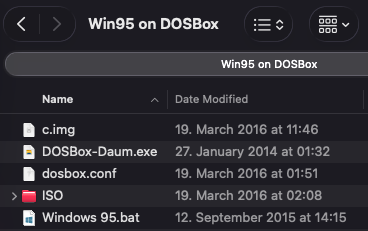
c.img- A virtual hard disk image to simulate Windows 95.DOSBox-Daum.exe- The Windows DOSBox-Daum launcher. On macOS, we’ll use DOSBox-X instead.dosbox.conf- Configuration file for DOSBox, containing settings like memory, CPU, and display.ISO/- Folder containing a game installer disc. The game requires the installer disc to run; without them, it won’t launch.Windows 95.bat- A batch file that launches DOSBox-Daum with the proper configuration to start Windows 95. On macOS, I’ll show a separate version using DOSBox-X instead.
Step 2: Install DOSBox-X
- Go to the official DOSBox-X website: https://dosbox-x.com/
- Download the macOS version that matches your Mac’s architecture:
- Intel-based Macs
- Apple Silicon (M1/M2)
- Install DOSBox-X normally.
-
Step 3: Create a Simple Launcher
- Open Terminal and navigate to your game folder.
- Create a new executable file:
touch start.command chmod u+x start.command - Right-click the newly created
start.commandfile and open it with a text editor. Copy and paste the following lines:#!/bin/bash cd "$(dirname "$0")" DOSBOX_X_EXECUTABLE="/Applications/dosbox-x.app/Contents/MacOS/dosbox-x" "$DOSBOX_X_EXECUTABLE" -conf dosbox.conf exit - Save it
- Note the first two commands are to create and add the executable permission (
+x) to the current user (u) and the file is a shortcut to runs DOSBox-X with the specified configuration file (dosbox.conf).
Step 4: Launch and play
- Double-click on
start.command. - A Terminal window and a DOSBox-X window will open.
- The first time you launch, Windows 95 inside DOSBox-X will install some drivers.
- You may be asked to restart Windows 95 twice.
- This only restarts the virtual Windows 95, not your Mac.
- Just hit a button with (Y) whenever prompted.
- After the setup completes, you can launch Doraemon Monopoly and start playing!
- There are two versions of the game on the computer
 the first one is the Chinese version and the second is the Taiwanese version.
Note: The game link is copied from the original Windows guide on PTT.
I will update the tutorial soon, pardon me (◞‸◟;)

Join the discussion!